



Cold calling remains a vital sales strategy, as research shows that 69% of buyers have accepted cold calls from new providers in the past 12 months. However, sales reps actually spend an average of 15% of their time talking to prospects, with the rest consumed by manual tasks like dialing numbers and logging call notes.
Cold calling software enters the scene as tools designed to automate key aspects of the sales calling process, maximizing rep efficiency. Studies find that sales agents using auto-dialers make up to 80 calls per day compared to just 20 without automation. The right cold calling software leads to more conversations, higher conversion rates, and faster revenue growth.
This article breaks down the best cold calling software solutions to boost your sales team's productivity in 2025. From automatic dialers to AI-powered conversation intelligence, these tools help you connect with more prospects in less time.
Top 10 Cold Calling Software Comparison Table
Best Cold Calling Software in 2025
1. Outdoo AI
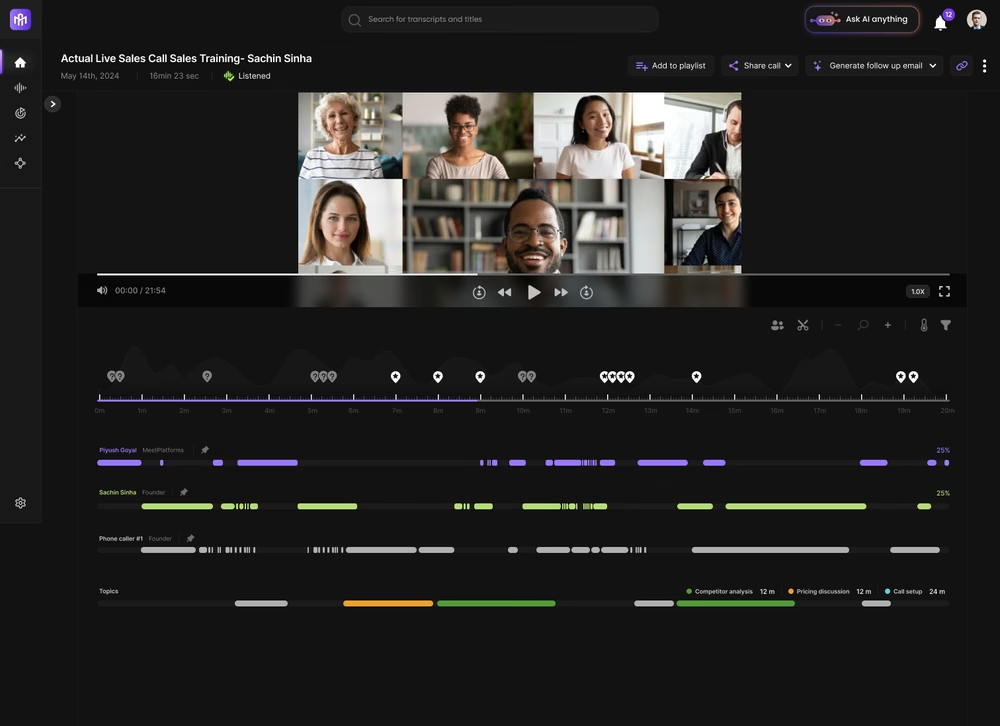
Outdoo leads the pack as a Revenue Intelligence and sales coaching platform that supercharges cold calling with AI-driven insights. It isn’t a dialer itself, but rather a conversation intelligence tool that integrates with your calling systems (e.g. phone dialers, Zoom, CRM) to record and analyze every sales call. Outdoo uses advanced AI to transcribe conversations, analyze sentiment, and generate coaching feedback in real time. It even offers an AI sales role-play module, enabling reps to practice cold calls with a lifelike AI agent for training purposes. By turning each customer interaction into actionable data, Outdoo helps teams refine their messaging and improve cold call outcomes through continuous learning and coaching.
Key Features:
- AI-Powered Conversation Intelligence: Automatically records and transcribes calls, then analyzes them for keywords, sentiment, and outcomes. Every call is turned into rich data for review
- Real-Time Call Coaching: Provides instant, context-aware cues during live calls (e.g. objection handling tips or reminder of key value props) to guide reps toward successful outcomes.
- AI Sales Roleplay Simulator: Allows sales reps to practice cold calling in a safe environment with AI-driven virtual prospects, honing their skills in handling objections and different scenarios.
- Customizable Analytics Dashboards: Tracks metrics like talk-listen ratio, call sentiment trends, and conversion rates. Identifies patterns of top performers to replicate success across the team.
- Seamless Integrations: Connects with popular CRMs and dialers (Salesforce, HubSpot, etc.) so call records and insights automatically log into existing workflows. This ensures coaching insights are embedded into your sales process rather than siloed.
- Deal Intelligence & Pipeline Analysis: Beyond calls, Outdoo examines pipeline activity (e.g. emails, deal stages) to flag at-risk deals and key buyer signals. It can score deals and highlight where to focus to boost win rates.
2. Dialpad
Dialpad is a versatile business communications platform that integrates voice, video, and messaging – and it has made a name for itself with powerful AI features for sales calls. As an AI-enabled phone system, Dialpad offers real-time call transcription and a Voice Intelligence engine that analyzes conversations as they happen. This means sales reps can rely on Dialpad to capture every word of a cold call and even get live insights (like sentiment analysis or suggested responses).
Key Features:
- Real-Time Transcription: Dialpad automatically transcribes calls on the fly with high accuracy. Reps see a live transcript, allowing them to reference details or keywords in real time without losing focus on the conversation.
- Voice Intelligence & Sentiment Analysis: The AI not only transcribes but also analyzes tone and keywords. It can detect customer sentiment and highlight moments (e.g., when a competitor is mentioned or when a customer sounds frustrated).
- Seamless Integrations: Integrates with CRMs like Salesforce and HubSpot, as well as collaboration tools like Slack. Call logs, transcripts, and recordings can auto-sync to your CRM for streamlined record-keeping
- Call Routing & Multi-Channel Communication: Beyond AI, Dialpad is a full cloud phone system with advanced call routing, voicemail drop, as well as video conferencing and SMS – enabling you to reach prospects on multiple channels from one platform.
Pricing Details:
Dialpad has a tiered subscription model (per user per month):
- Standard Plan – $20/user/month: Includes the core business phone system features, unlimited calling within US/Canada, SMS, basic AI transcription, and integrations. Good for small teams needing the basics.
- Pro Plan – $30/user/month: Adds on more advanced analytics, 24/7 support, global SMS, and a boost in AI features like enhanced Voice Intelligence and CRM integrations. Suitable for growing teams wanting more insights.
- Enterprise Plan – Contact for pricing: Custom pricing for large organizations, unlocking the full suite of AI capabilities (like unlimited recording transcription storage, advanced admin controls, and dedicated support).
Note: Pricing may vary or have discounts if paid annually. Dialpad also offers a 14-day free trial so teams can test its features.
3. Salesken
Salesken is an AI-driven sales assistant that focuses on real-time guidance during sales calls. Think of it as having a virtual coach sitting next to every sales rep on a cold call. Salesken’s platform listens to conversations and uses machine learning to provide contextual cues and suggestions in the moment. In addition to live cues, Salesken also offers deep analytics and post-call insights – helping managers track performance and identify areas for improvement. It effectively bridges the gap between training and live execution, ensuring that best practices are followed on each call.
Key Features:
- Real-Time Conversation Analysis: Salesken’s AI actively listens to sales calls and analyzes conversation context as it unfolds. It detects customer questions, objections, or buying signals and retrieves the best responses or talking points from your playbook in real time.
- AI-Powered Cues and Prompts: Provides live cues on the rep’s screen – for example, if a customer mentions a competitor, Salesken might display a battle card; if the customer expresses a need, it might suggest a relevant case study or value proposition. This ensures reps can navigate objections and highlight the right benefits without missing a beat.
- Personalized Sales Playbooks: You can customize Salesken’s prompts based on your sales methodology or scripts. The AI learns from your best-performing calls to refine what advice it gives, essentially creating an evolving playbook of what works.
- CRM Integration & Call Recording: Salesken integrates with popular CRMs and telephony systems, logging call data and transcripts. It records calls and stores transcriptions so that you can review what was said and how the AI suggestions were used.
Pricing Details:
Salesken offers custom pricing based on the number of users and specific features needed. They typically work with you to tailor a plan (often encompassing a platform fee plus a per-user license). Because it’s a high-touch solution, you’ll need to contact Salesken for a quote.
4. Insight7
Insight7 is an AI-powered call analytics and customer insights platform designed to extract actionable intelligence from sales calls. Unlike some tools that focus on real-time prompts, Insight7 emphasizes deep analysis of calls to understand customer needs, sentiments, and opportunities. It automatically transcribes and analyzes calls to surface patterns – for example, common pain points customers mention, sentiment trends, or product feedback.
Key Features:
- Sentiment Analysis: The platform analyzes the emotional tone of each conversation, tagging parts of calls as positive, negative, or neutral sentiment. Managers can quickly identify if cold calls are generally hitting the mark or if prospects are reacting poorly at certain talk tracks.
- Customer Insights Extraction: Rather than merely logging calls, Insight7 uses AI to pull out key themes and topics from conversations. It might automatically flag that many prospects ask about a certain feature, or that pricing is a recurring objection. These insights help you adjust your messaging or product positioning.
- Opportunity Ranking: A unique feature – Insight7 can rank product or service opportunities from calls. For instance, by analyzing language and interest level, it might indicate which leads seem most promising or which product features spark the most interest, helping with lead prioritization.
- InsightGraph and Dashboards: The platform offers a visual “InsightGraph” or similar dashboards that show trends across all calls (common keywords, topics frequency, competitor mentions, etc.). This gives a macro view of market feedback straight from your calls.
Pricing Details:
Insight7 offers a few tiers:
- Basic Plan – $15/user/month: Likely includes core call recording and basic analytics features for a smaller team to get started with call insights.
- Professional Plan – $25/user/month: Adds more advanced analysis, sentiment, and possibly more integrations or user seats. Suitable for mid-sized teams wanting deeper insights and customization.
- Enterprise Plan – Contact for pricing: Custom pricing for large organizations, including premium support, custom integrations, and full feature access (like InsightGraph, etc.). This plan would be tailored to specific needs and volume of calls.
Each higher tier brings more comprehensive analytics and perhaps better support SLAs. It’s recommended to start with a trial if available to see which tier fits your needs.
5. Fireflies.ai
Fireflies.ai is an AI meeting assistant that enhances productivity by automatically recording and transcribing calls and meetings. While not a dialer or cold call auto-dialer itself, Fireflies is extremely handy for anyone making sales calls because it captures the conversation and makes it easily searchable and shareable later. Fireflies uses AI to index and analyze these call transcripts, enabling you to search for specific keywords or topics across all your calls in seconds. It’s a fantastic tool to pair with cold calling efforts for documentation and follow-up.
Key Features:
- Automatic Call Recording: Fireflies can integrate with your conferencing tools (Zoom, Google Meet, Teams) or even your phone system to automatically record calls. No more forgetting to hit the record button – it’s hands-off.
- AI Transcription (Searchable): Every recorded call is transcribed using AI. Fireflies provides near real-time transcripts for calls, and these transcripts are searchable.
- Voice Intelligence Search: Beyond basic keyword search, Fireflies has AI filters to find things like names, dates, metrics, tasks mentioned. This helps in quickly filtering calls where, say, pricing was discussed or a follow-up was promised.
Pricing Details:
Fireflies.ai has straightforward plans:
- Free Tier – $0: Record and transcribe a limited number of meetings (e.g., up to X minutes per month). Good to test out basic functionality.
- Pro Plan – $10/user/month: Includes unlimited recordings and transcriptions for the user, plus advanced search and integrations with apps like Zapier, Slack, etc. Great for individual power users or small teams.
- Business Plan – $19/user/month: Aimed at teams – includes everything in Pro, plus collaborative workspaces, more advanced analytics, CRM integration (HubSpot, Salesforce), and longer storage duration. It also offers features like custom vocabulary for better transcription of industry terms.
- Enterprise – Custom Pricing: For larger organizations needing multiple team workspaces, single sign-on (SSO), higher security compliance, and dedicated support. Pricing would depend on volume and specific requirements.
Fireflies often provides discounts for annual billing. Notably, only the paid plans will give you the full benefit in a sales team context (free is quite limited).
6. Air.ai
Air.ai is a cutting-edge solution in the cold calling space because it isn’t just assisting human reps with AI – it is an AI that can make calls on your behalf. Billed as “the world’s first AI that can have full 10-40 minute phone conversations like a real human”, Air.ai acts as an AI sales representative. Air.ai leverages advanced conversational AI with an “infinite memory” of context to follow complex dialogues.
Key Features:
- Human-Like AI Voice Calls: Air.ai’s most notable feature is its ability to conduct full phone calls with human-level dialogue. The AI’s voice is designed to sound natural and conversational, far from a robotic script reader. It can handle long calls (up to 40+ minutes) maintaining context throughout.
- Context Awareness and Memory: The AI agent remembers details across the entire conversation and even across multiple calls. If a prospect mentions their needs or objections, Air.ai will recall that later in the call (or a follow-up call) with perfect recall. This “infinite memory” allows it to navigate complex multi-step dialogues like a skilled salesperson, rather than a typical IVR system.
- Objection Handling & Dynamic Scripting: Air.ai isn’t a fixed script bot; it uses AI to dynamically respond to what the prospect says. It’s trained on sales dialogues, so it can address common objections (e.g., “I’m not interested,” or “Call me next quarter”) with appropriate rebuttals or questions. It follows branching paths in conversation intelligently.
- Lead Qualification & Appointment Setting: Companies often use Air.ai to do the initial outreach and qualification. The AI can ask discovery questions, determine if the lead meets certain criteria, and if so, schedule a meeting or warm transfer to a human rep. It essentially functions as an AI SDR for top-of-funnel calls.
Pricing Details:
Air.ai operates on an enterprise pricing model:
- Upfront License: There is a steep upfront fee (reports indicate $25,000 to $100,000+ depending on company size/use case) just to get started. This typically covers initial setup, customization, and a certain usage package.
- Usage Fees: In addition to the license, Air.ai charges per-minute for calls. For example, roughly $0.11 per minute for outbound calls (and higher for inbound). So a 10-minute call might cost $1.10. If you’re making thousands of minutes of calls, this adds up and you pay as you go for usage.
- Additional Costs: There might be telephony fees, integration costs, or other add-ons depending on your needs. Also, enterprise support or custom feature development would be negotiated.
Because of this model, Air.ai ends up being viable mainly for large-scale operations where the volume is high enough to justify that initial cost. For those looking for alternatives with more flexible pricing, there are emerging competitors with lower entry barriers . Essentially, Air.ai is a heavyweight solution – priced accordingly.
7. OutplayHQ
Outplay (often referred to as OutplayHQ) is a multichannel sales engagement platform that helps sales teams streamline and automate their outreach across various channels, including cold calls. While not exclusively an “AI cold calling” tool, it incorporates AI insights and automation to boost sales productivity. You can think of Outplay as similar to platforms like Outreach or Salesloft – it allows you to create sequences (cadences) of touches via email, phone calls, SMS, LinkedIn, etc., to systematically engage prospects.
Key Features:
- Multichannel Outreach Sequences: Design sales sequences that include steps like send email, then Day 3 make a call, Day 5 LinkedIn touch, etc.. Outplay automates these flows, reminding reps to make the calls when scheduled and automatically sending the emails. This ensures consistent follow-up on cold leads across multiple channels.
- Built-in Sales Dialer: Outplay offers a power dialer for calls. Reps can make calls directly from the platform (with options like local caller ID presence), and calls are logged automatically. The dialer is integrated with the sequence, so when a call task comes up, you just click and dial.
- Conversational Intelligence Add-On: According to some sources, Outplay has conversation intelligence capabilities too. This could mean it can record/transcribe calls or at least integrate with tools for analyzing call content, thereby giving some AI-driven insights into call quality or topics discussed.
- Integrations: Works with CRMs like Salesforce, HubSpot, Pipedrive, etc., so your contact data and activity sync seamlessly. It also integrates with email providers and calendars (for scheduling meetings when a prospect is ready).
Pricing Details:
Outplay typically offers these plans:
- Starter Plan – $30/user/month: Core functionality for outreach: email sequences, basic dialer, task management, basic analytics. Good for small teams getting started with automation (some limitations on contacts or emails likely).
- Growth Plan – $50/user/month: Adds more power – LinkedIn integration, two-way CRM sync, advanced analytics, maybe the conversation intelligence feature, and possibly more customization in sequences. This is aimed at scaling teams needing the full multichannel approach.
- Enterprise Plan – Custom Pricing: For larger organizations needing higher usage limits, dedicated support, single sign-on, and custom features/security. This plan might also include any new AI features or tailored integrations. Pricing would depend on the size of team and specific requests.
Outplay sometimes provides a free trial or a limited free plan for a single user to test the waters. It’s also worth noting pricing can evolve, so always check their site for the latest. But the above gives a ballpark.
8. InsideSales
InsideSales (formerly XANT), is an AI-powered sales engagement platform geared towards enterprise needs. It offers a suite of tools under its Playbooks product that help sales reps reach out to the right prospects at the right times using AI and automation. In the context of cold calling, InsideSales ensures reps spend their time on the highest-value prospects and gives guidance on when to call and what to focus on. It effectively augments sales workflows with AI so that teams can scale outreach in a smarter, more targeted way.
Key Features:
- Playbooks for Sales Cadences: InsideSales Playbooks allows creation of structured sequences of touchpoints with prospects (calls, voicemails, emails, etc.). It automates and tracks these steps, ensuring consistent follow-up.
- Lead Prioritization with AI: One of the standout features – the system uses AI to score and prioritize leads. It looks at data signals like engagement, fit, and past outcomes to tell reps who they should call next for the best odds of success. This helps tackle that classic “who do I call now?” problem by focusing on the most promising contacts.
- Automated Data Capture: InsideSales automates things like call logging, email tracking, and updating CRM records. It spares reps from tedious data entry, as calls made through the system are automatically recorded in the CRM, notes can be templated, etc.. This ensures data quality and frees time for selling.
- Buyer Intelligence Signals: InsideSales integrates data about the buyer’s engagement and behavior. For example, it might pull in if the buyer opened your email or attended a webinar (or even external intent data), and use that to cue up a call. It gives reps context on what the prospect has been up to so the cold call becomes slightly warmer.
Pricing Details:
InsideSales doesn’t publicly list pricing; they customize it per client. Typically, it would involve:
- License per user: A monthly or annual per-seat cost for the Playbooks platform. Given similar tools, this might be in the range of $100+ per user/month for a full-featured package, but it can vary widely.
- Package Tiers: They might have different packages or modules (for example, core Playbooks vs. additional analytics modules or dialer minutes). Some parts could be add-ons.
- Volume and Contract: Enterprise deals often scale pricing based on number of seats and length of contract. Committing to a large team or multi-year can lower per-user costs.
- Onboarding/Services: Sometimes priced separately, some vendors charge for implementation or offer premium support at a cost.
The bottom line: Contact InsideSales (XANT) for a tailored quote. They’ll likely assess your team size and needs, then propose a plan.
9. ZoomInfo
ZoomInfo is best known as a sales intelligence and B2B contact data platform, but in recent years it has expanded to offer an integrated suite of tools that assist with prospecting, outreach, and even conversation intelligence. For cold calling, ZoomInfo is highly valuable because it provides direct dials and accurate contact information for millions of business professionals – essentially fueling your cold call list with high-quality data.
Notably, ZoomInfo also acquired Chorus.ai, a leading conversation intelligence tool, which means that within ZoomInfo’s ecosystem, you can get AI-driven call analysis and transcription as well. In summary, ZoomInfo can be seen as a one-stop shop: get your prospects’ phone numbers, call them within the platform, have the calls analyzed by AI, and feed that data back into improving your approach.
Key Features:
- Extensive Contact Database (SalesOS): ZoomInfo offers access to over 100 million contacts and company profiles with direct phone numbers, email addresses, company firmographics, org charts, etc. This is gold for cold calling because having the right number and context for a prospect is half the battle.
- Intent Data and Scoops: ZoomInfo provides intent signals and news (“Scoops”) about companies. For example, if a company has been searching heavily for CRM solutions (captured via third-party intent data) or announced a new round of funding, you’d see that. This helps prioritize who to cold call (call those showing buying signals) and tailor your pitch to what’s happening on their end.
- Engage (Sales Engagement Tool): ZoomInfo Engage is a module that lets you sequence outreach with calls and emails. It includes a dialer to make calls directly and log them. Engage can work as a power dialer for cold calls and ensures those calls are part of a broader tracked campaign.
- Conversation Intelligence (Chorus.ai): Within ZoomInfo, you can use Chorus to automatically record and transcribe calls, then analyze them for insights. Chorus’s AI will identify things like talk/listen ratio, topics discussed, next steps, sentiment, and even coach on how the call could be improved. All your cold call recordings become searchable and analyzable.
Pricing Details:
ZoomInfo’s pricing is not public and is known to vary. Typically:
- SalesOS (Core Contacts Database): Priced by the number of seats and credits (contacts) you need. It can range from a few thousand dollars for a single seat to tens of thousands annually for teams. Often it’s sold in packages (Professional, Advanced, Elite) with varying features.
- Engage: Could be an add-on per seat or bundled in higher tiers. If separate, maybe on the order of $40-$60 per user/month list price (just an estimate from comparable tools), but again likely discounted in a bundle.
- Chorus Conversation Intelligence: Also an add-on or included in top-tier bundles. Conversation intelligence tools often run $100+ per user/month by themselves. In a bundle ZoomInfo might effectively charge less, but standalone Chorus via ZoomInfo is usually aimed at larger deals.
- Other Add-ons: ZoomInfo has things like OperationsOS, MarketingOS, etc. If a company starts adding multiple modules, the deal can become enterprise-level pricing pretty quick.
They will ask you to talk to a rep who will tailor it to your needs (and often they try to upsell to the broader platform). As always, negotiate based on what you truly need.
10. HubSpot
HubSpot is a well-known CRM platform that offers a full suite of tools for marketing, sales, and customer service. In the context of cold calling and sales outreach, HubSpot’s Sales Hub provides capabilities that include a built-in phone dialer, contact management, email sequencing, and even AI-powered features like conversation intelligence and predictive lead scoring. HubSpot is particularly valued for being user-friendly and an all-in-one solution.
While HubSpot’s calling features may not be as deeply specialized in AI as some dedicated tools, it has robust functionality and integrates tightly with the rest of your sales process (since it’s your CRM as well). It also has the advantage of offering a free tier, which can be great for very small teams to get started.
Key Features:
- CRM with Contact Management: At its core, HubSpot is a CRM where you store all your contacts, companies, deals, and activities. For cold calling, this means you can easily organize lead lists, track call outcomes, and have full context (like past emails or website visits) when you make the call, all on the contact’s timeline.
- Built-in Calling & Dialer: HubSpot allows you to call directly from the CRM. You can use HubSpot’s calling (which gives you a call minutes bundle, or connect a third-party phone provider) to make calls with one click from a contact record. Calls can be recorded (with consent) and automatically logged. The dialer isn’t power-dialer style by default, but you can call through a queue of contacts relatively efficiently.
- Sales Sequences: HubSpot lets you create sequences (which are essentially cadences of emails and tasks). For example, you can make a sequence that says: Day 1 send email, Day 3 call (creates a call task), Day 5 LinkedIn connect (task), Day 7 follow-up email, etc. This helps structure your cold outreach. It’s not as elaborate as some dedicated sales engagement tools, but for many it’s sufficient and nicely integrated.
- Email Templates & Tracking: If your cold calls are part of a broader outreach, HubSpot provides template libraries and email tracking (know when a prospect opens an email or clicks a link). This can inform your call timing (e.g., call right after they click something). Also, templates and snippets can be used to quickly log call notes or common call outcomes.
Pricing Details:
HubSpot’s sales tools come in several tiers (with increasing functionality):
- Free CRM & Free Sales Tools: $0 – Includes basic CRM, contact management, deal tracking, and limited one-off emails/calls (up to a certain number per day). Good to get started, but lacks sequences and advanced features. Calling is available but limited in minutes.
- Starter (Sales Starter) – $50/month (for 2 users, then ~$25/additional user): Adds some essentials like more calling minutes, simple automation (like email sequences up to 10 steps, but maybe not tasks), removal of HubSpot branding. Still fairly basic but usable for a small team on a budget.
- Professional (Sales Professional) – $500/month (up to 5 users, then additional): This is where the serious features come in. Includes Sequences with more steps, Conversation Intelligence (call transcription/analysis), lead scoring, workflow automation (if X happens, do Y), sales analytics, and more integration options. Most growing teams use this tier. Price scales with users (it’s roughly $100 per user per month if you go above the included 5).
- Enterprise (Sales Enterprise) – $1200/month (for 10 users, then additional): Adds advanced custom objects, predictive lead scoring AI, playbooks (for call scripts inside the CRM), advanced permissions, and increased limits. It’s for larger sales orgs who need more customization and control. Price per user can actually be lower at scale here, but you’re locked into a high base fee.
Note: These are approximate; HubSpot often has promotions or slight adjustments. They also offer bundles if you also buy Marketing or Service Hubs. Importantly, annual contracts are standard for Pro and above (monthly is an option at a slightly higher rate if you insist).
How to Choose the Best Cold Calling Software
When selecting the best cold calling software for your business, consider these factors:
1. Integration Capabilities: Ensure the software integrates seamlessly with your existing CRM and other business tools.
2. Scalability: Choose a platform that can grow with your business and accommodate increased call volumes.
3. Analytics and Reporting: Look for software that offers detailed analytics to help you track performance and optimize strategies.
4. Ease of Use: Select a user-friendly platform with a minimal learning curve for your team.
5. Pricing: Consider your budget and choose a platform that offers the features you need at a price you can afford.
Benefits of Using Cold Calling Software
1. Improved Efficiency
Cold calling software automates many repetitive tasks associated with sales calls, allowing your team to focus on closing deals.
2. Enhanced Performance Tracking
Detailed analytics and reporting features provide insights into your team's performance, helping identify areas for improvement and optimize sales strategies.
3. Better Lead Management
Integration with CRM tools ensures all your lead data is organized and accessible in one place, making it easier to manage and track your leads.
4. Increased Scalability
Cold calling software accommodates increased call volumes and growing teams, making it an ideal solution for businesses looking to scale operations.
5. Real-Time Coaching
Many cold calling software solutions offer real-time coaching features that help sales reps improve their performance and close more deals.
Conclusion:
Outdoo stands out as a top choice for businesses seeking to enhance their cold calling efforts with AI-driven insights and comprehensive call analytics. With its seamless CRM integration and real-time coaching features, Outdoo AI provides sales teams with the tools needed to optimize performance and close more deals. Whether you're a small business or a large enterprise, Outdoo offers scalable solutions that can grow with your business and help achieve sales goals.
Frequently Asked Questions
.svg)
Cold calling software is a tool designed to help sales teams manage and track their calls, automate repetitive tasks, and gain insights into their performance.
Cold calling software provides detailed analytics and reporting features that help sales teams identify areas for improvement and optimize strategies, leading to increased sales performance.
Yes, many cold calling software solutions offer affordable pricing plans and scalable features suitable for businesses of all sizes, including small businesses.
Most cold calling software solutions offer integration with popular CRM tools, allowing you to manage leads and track performance directly from your CRM dashboard.
Yes, advanced cold calling software goes beyond tracking and analytics by offering call recordings, transcripts, and performance insights that managers can use for structured coaching. Platforms like Outdoo further enhance this with AI-driven feedback and roleplay simulations, helping reps practice and continuously improve their cold calling skills.
Table of Contents
Talk to Sales
Have questions about training and enablement for your sales, CS, support, or leadership team? Let's talk.
Talk to Sales