




Sales teams need every advantage to close deals and drive revenue growth in today's competitive business landscape. Research shows that companies with a dedicated sales enablement function achieve a 49% win rate on forecasted deals, compared to just 42.5% for those without. The category is now mainstream: 65% of organizations use sales enablement technology, and AI adoption in sales training jumped 164% in a single year.
Sales enablement tools have emerged as a game-changer, empowering sales reps with the content, insights, and training they need to engage prospects effectively. A recent survey found that 76% of organizations using sales enablement tools reported significant improvements in sales effectiveness.
From AI-powered content management to real-time analytics and coaching, the right sales enablement software can streamline processes, enhance customer interactions, and drive more conversions. This article highlights the top sales enablement tools that can supercharge your sales team's performance and boost your revenue. For a closer look at the AI side of the stack, see our guide to the top AI tools for sales enablement teams.
Comparing the Top Sales Enablement Tools
| Software Name | Key Features | Pricing Details |
|---|---|---|
| Outdoo AI | AI roleplay simulations, unified scoring across practice and live calls, closed-loop coaching, CRM integration | Free, Usage-based, or Custom |
| Dialpad | Real-time transcriptions, unified communications, CRM integration, mobile app | Standard: $15/user/month, Pro: $25/user/month, Enterprise: Contact for pricing |
| Zime AI | Deal-aware AI role plays, real-time coaching, pre-call prep notes & pipeline review | License-based pricing |
| Dealfront | Lead generation, market insights, CRM integration, email tracking | Custom Pricing |
| Dock | Revenue Enablement Built Around the Buyer Experience | Free tier, Paid plans start at $350/month for up to 5 users |
| Whatfix | In-app guidance, user analytics, multi-language support, customizable training | Contact for Pricing |
| Highspot | Content management, analytics, CRM integration, customizable playbooks | Custom Pricing |
| HubSpot | CRM, marketing automation, sales pipeline, analytics | Free tier, Paid plans start at $15/user/month |
| Spekit | In-app guidance, analytics, multi-language support, responsive support | Contact for Pricing |
| Allego | Video coaching, content management, mobile access, customizable training | Contact for Pricing |
| Outreach | Sales automation, CRM integration, customizable workflows, mobile access | Contact for Pricing |
Best Sales Enablement Tools in 2026
1. Outdoo AI: Enterprise AI Roleplay and Coaching Platform
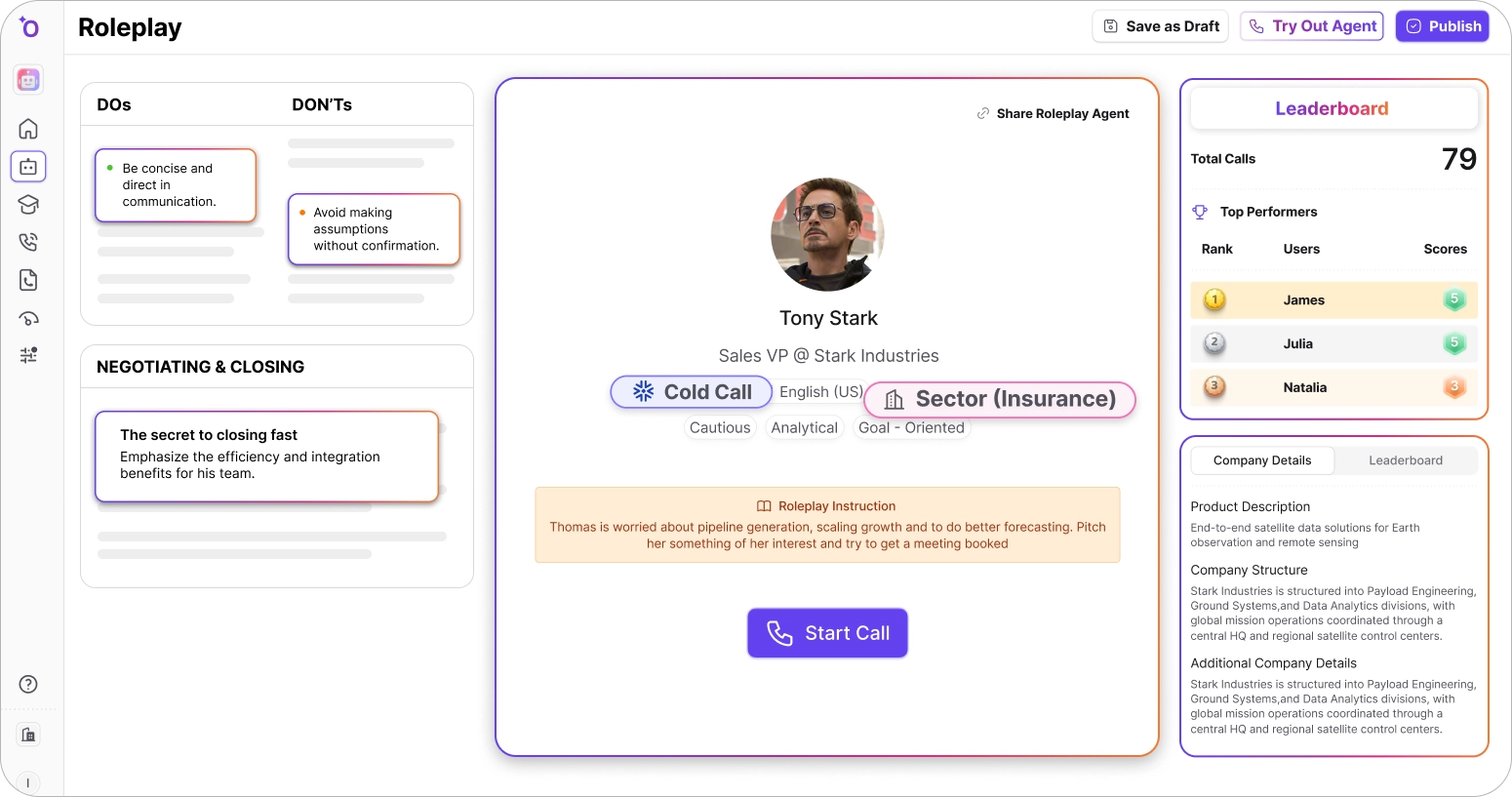
Outdoo AI stands out on this list because it solves the part of enablement most tools ignore: not just giving reps content and training, but making sure they can actually execute. It is an enterprise AI roleplay and closed-loop coaching platform where reps practice realistic buyer conversations against AI personas built from real pipeline calls, including multi-persona simulations with up to 3 stakeholders for complex deals.
The differentiator is the closed loop: the same AI scorecard runs across both practice sessions and live calls, aligned to MEDDIC, BANT, SPIN, or custom frameworks. So enablement is not just measured by content usage or training completion, but by whether reps actually improved. Outdoo also includes conversation intelligence and CRM-synced analytics as supporting capabilities, bringing practice, live execution, and coaching into one system.
See how AI roleplay turns enablement into real execution:
Key Features:
- AI Roleplay Simulations: Reps practice realistic buyer conversations against AI personas, including multi-persona scenarios with up to 3 stakeholders, built from real pipeline calls.
- Unified AI Scoring: The same scorecard runs across both practice and live calls, aligned to MEDDIC, BANT, SPIN, or custom frameworks.
- Closed-Loop Coaching: Weak objection handling or missed discovery automatically triggers targeted micro-roleplays for reinforcement.
- Conversation Intelligence: Analyzes live calls for talk ratios, objection handling, and methodology adherence to support coaching.
- CRM Integration: Seamlessly integrates with CRM platforms so enablement data reflects skills reps have actually practiced.
- Enterprise-Ready: 120+ languages, 150+ integrations, and GDPR, HIPAA, SOC 2, and CCPA compliance.
Pros:
- Practice Before Live Deals: Reps rehearse real scenarios with AI buyer personas, so skills are sharpened before the call, not after.
- Unified Scoring: The same framework scores practice and live calls, so leaders can prove coaching changes behavior.
- Faster, Consistent Ramp: New reps practice real scenarios on-demand, so onboarding is faster and more consistent across the team.
- User-Friendly Interface: Easy to navigate with minimal training required.
- Multi-Persona Roleplays: Simulate up to 3 stakeholders in one session to prepare reps for complex, committee-driven deals.
- Excellent Customer Support: Known for responsive and helpful service.
Cons:
- Built for Teams, Not Solo Reps: Designed for sales organizations, so freelancers or individuals wanting only basic tools may find it more than they need.
- Requires Manager Buy-In: Gets the most value when managers actively use the coaching workflows, not just assign practice.
- Custom Pricing: Tailored pricing means you work with their team for a quote rather than a fixed per-seat list price.
- More Than Notetaking: Because it covers roleplay, coaching, and scoring, teams looking only for a lightweight call recorder may find it broader than needed.
Pricing:
Outdoo offers a Free plan to get started, plus Usage-based and Custom plans. For more details and a personalized quote, please schedule a demo.
Best For:
Sales teams that want enablement to translate into execution, pairing content and training with AI roleplay practice and closed-loop coaching so reps are ready to perform.
2. Dialpad: The Intelligent Communications Solution

Dialpad offers a unique blend of communication tools with a focus on voice intelligence. It enables sales teams to have smarter conversations by providing real-time insights and transcriptions. This makes it a powerful tool for businesses improving communication efficiency and effectiveness across sales teams.
Key Features:
- Voice Intelligence: Provides real-time transcriptions and insights during calls.
- Unified Communications: Combines calls, messages, and meetings into one platform.
- CRM Integration: Connects with popular CRM systems for streamlined data flow.
- Customizable Call Routing: Directs calls based on custom rules.
- Analytics Dashboard: Offers metrics and insights into communication performance.
- Mobile App: Accessible on-the-go with a user-friendly mobile application.
Pros:
- Real-Time Insights: Enhances call quality and effectiveness with live transcription.
- All-in-One Solution: Integrates multiple communication channels.
- Scalable for Large Teams: Accommodates growing team sizes.
- Reliable Performance: Known for high-quality call and video performance.
- Easy CRM Integration: Facilitates data synchronization across platforms.
- Mobile Flexibility: Users can access features from any location.
Cons:
- Price Point: Higher cost could be a barrier for smaller businesses.
- Setup Complexity: Initial configuration may require technical expertise.
- Limited Customization: Some features may not be customizable to specific needs.
- Learning Curve: New users may need time to adapt to functionalities.
- Occasional Latency Issues: Users have reported minor delays during peak times.
Pricing:
- Standard: $15/user/month
- Pro: $25/user/month
- Enterprise Plan: Contact the website for more details.
Best For:
Enterprises seeking a comprehensive communication tool with advanced voice intelligence features.
3. Zime AI: Turning Sales Strategy Into Real Execution
Zime AI earns its place on this list because it tackles the part of sales enablement most tools quietly skip: not just arming reps with content and training, but making sure they actually execute the winning play on a live deal. Where most platforms stop at recording calls, organizing decks, or certifying reps, Zime learns how your best deals close and embeds those winning behaviors directly into each rep's daily workflow, right before the call that matters.
The differentiator is a context layer that sits underneath everything Zime does. Most enablement tools treat every rep, deal, and call the same way; Zime's Forward Deployed Engineers build a live model of your specific go-to-market motion, pulling from won and lost deal transcripts, CRM stage and field data, competitor mentions, persona and segment signals, and your team's actual talk tracks, not generic best practices. That model becomes the "Living Playbook," mapped to product, persona, segment, deal stage, and competitor, and it's what every downstream feature reads from: role plays are built from real opportunity context, in-call nudges fire based on what's actually happening in that deal, and coaching is scored against your playbook rather than a generic rubric. The playbook itself is refreshed quarterly as your GTM motion shifts, so the context layer doesn't go stale the way a one-time onboarding doc would.
In practice, this means two reps working different deals get different guidance, not the same training module. A rep on an enterprise multi-stakeholder deal sees prep notes built from how your top performers have handled that persona and competitor combination before; a rep on a faster-moving mid-market deal gets a different next-best-move, because the context layer knows the stage and deal type are different. That's the structural difference between Zime and tools that deliver the same content to every rep regardless of what's actually on their calendar.
Key Features:
- Living Playbook: A custom execution engine built from your own win/loss data, call history, and CRM context, mapped across product, deal stage, segment, and competitor, and refreshed every quarter as priorities shift.
- Deal-Aware Role Plays: Reps practice against realistic AI buyers built from the actual opportunity, including account context, persona, stage, competitor, and past call history, then get scored on Winning Behaviors before the real call.
- Real-Time Coaching: Detects live deal moments, such as severe objections, competitor mentions, persona shifts, and weak next steps, and surfaces short, context-aware nudges while the buyer is still on the call.
- Pre-Call Actions & Prep Notes: Delivers deal-specific guidance the hour before each call, so reps walk in knowing the next best move without digging through a portal.
- Pipeline Review & CRO Twin: Gives leaders an evidence-based view of which deals are at risk and why, based on playbook adherence, discovery completeness, and stakeholder coverage.
- CRM Auto-Update & Workflow Integration: Automates post-call admin and lives inside existing workflows, so adoption doesn't depend on reps learning yet another dashboard.
Pros:
- Execution, Not Just Observation: Goes beyond telling teams what happened on a call and tells reps what to do next, turning strategy into action on live deals.
- Behavioral Change at Scale: Codifies the patterns that make top reps effective and gets the rest of the team to actually adopt them, narrowing the gap between top and median performers.
- Fast Deployment: A first playbook can be live in around 7 days rather than the typical 6 to 9 months it takes to build and roll out a new enablement program.
- Context-Aware Guidance: Coaching and role plays are tied to the specific deal, persona, stage, and competitor, not generic scripts.
- Measurable Adoption: Every interaction is scored against your playbook, so leaders can prove that coaching actually changed rep behavior.
- Meets Reps Where They Work: Guidance shows up in Slack, Teams, and email, lowering the friction that kills adoption of standalone tools.
Cons:
- Built for Sales Teams, Not Solo Reps: Designed for organizations with a meaningful number of account executives, so freelancers or very small teams may find it more than they need.
- Best for Complex, Multi-Stakeholder Motions: The deepest value shows up in considered, committee-driven deals; teams running simple, transactional sales may not tap its full conditional logic.
- Requires Leadership Buy-In: Gets the most value when CROs and managers actively use the coaching and pipeline workflows, not just assign them.
- Custom Onboarding: Because Forward Deployed Engineers tailor the playbook to your motion, getting started involves working with their team rather than a self-serve, plug-and-play setup.
Pricing:
License based
Best For:
Enterprise sales teams that want enablement to translate into execution, pairing a strategy-aware Living Playbook with deal-aware practice and real-time coaching so reps don't just learn the play, they run it on every deal.
4. Dealfront: Empowering Sales with Lead Intelligence

Dealfront focuses on providing lead intelligence and generation tools, helping sales teams identify and engage with potential customers more effectively. It offers insights into buying signals and market trends, making Dealfront essential for businesses enhancing their lead generation capabilities.
Key Features:
- Lead Generation: Identifies new prospects based on buying signals.
- Market Insights: Provides data on industry trends and competitor activities.
- CRM Integration: Seamlessly integrates with existing CRM systems.
- Custom Reporting: Offers tailored reports to fit specific business needs.
- Email Tracking: Monitors email engagement to optimize follow-up strategies.
- Automated Workflows: Streamlines repetitive tasks for efficiency.
Pros:
- Improved Lead Quality: Enables focus on high-potential leads.
- Data-Driven Insights: Provides actionable data for strategic decision-making.
- Customizable Reports: Tailors insights to match business objectives.
- Seamless CRM Integration: Ensures consistent data flow and accessibility.
- Time-Saving Automation: Reduces manual effort with automated workflows.
- Scalable Solutions: Suitable for businesses of varying sizes.
Cons:
- Custom Pricing: Lack of transparent pricing may deter potential users.
- Learning Curve: Users may require training to fully utilize all features.
- Integration Challenges: May not integrate with less common CRM platforms.
- Initial Setup Time: Custom reports and workflows setup can take time.
- Cost: Premium features may be expensive for small businesses.
Pricing:
Custom Pricing: Based on specific business needs and scale.
Best For:
Businesses looking to enhance lead generation and market insights with data-driven tools.
5. Dock: Revenue Enablement Built Around the Buyer Experience

Dock is an AI revenue enablement platform that organizes everything shared with a prospect or customer into a single, shareable workspace. Rather than sending a trail of follow-up emails and attachments, reps create a dedicated link for each deal that houses relevant content, action plans, pricing, and onboarding materials,all in one place.
Dock also includes content management, learning management, AI tools that generate personalized documents from CRM data and call transcripts, and an AI agent that surfaces answers for reps mid-deal without requiring them to dig through internal wikis.
Key Features:
- Digital Sales Rooms: Create a dedicated workspace per deal that consolidates content, proposals, and next steps into one link buyers can easily share internally.
- AI Document Generation: Automatically produce business cases, meeting summaries, and executive briefs using live CRM data and call recordings.
- AI Enablement Agent: Gives reps on-demand answers to product, pricing, and process questions without leaving their workflow.
- Learning Management System: Build, organize, and distribute internal training programs with playbooks and courses.
- Content Library: Centralize customer-facing assets with AI-assisted tagging, version control, and engagement tracking across workspaces.
- Connected Workspaces: The same workspace transitions from deal room to onboarding hub to renewal portal, giving Sales and Customer Success a shared view of the customer.
Pros:
- Consolidates buyer-facing materials that would otherwise be scattered across email threads, Google Drive, and slide decks.
- AI document generation reduces time spent on manual follow-up and proposal creation.
- Workspace engagement data, who viewed what and when - gives reps a clearer read on deal momentum than CRM activity alone.
- Covers the full customer lifecycle, so Sales and Customer Success can hand off without losing context.
- Buyers don't need to create an account, lowering the friction to actually engage with shared content.
- Templates allow teams to standardize what gets sent at each stage without removing the ability to personalize per deal.
Cons:
- Premium plan requires minimum 5 users and annual billing, which reduces flexibility for smaller teams testing the tool.
- Works alongside a CRM rather than replacing it, adding to the tool stack rather than consolidating it.
- Teams heavily reliant on existing project management or CPQ tools may find some feature overlap.
- Takes some ramp time for teams used to sending static follow-up emails to adopt a workspace-first workflow.
Pricing:
- Free Plan: $0/month - up to 50 customer workspaces
- Standard Plan: $350/month (billed monthly) - unlimited workspaces, 5 internal users, Salesforce & HubSpot integration
- Premium Plan: $750/month (billed annually) - 10 internal users, advanced CRM features, content management, learning playbooks, order forms
- Enterprise Plan: Custom pricing - adds API access, SSO, custom domain, automation, and a dedicated customer success manager
6. Whatfix: Driving User Adoption and Engagement

Whatfix enhances user engagement and training by offering in-app guidance and support. It helps users navigate complex software systems with ease, making it invaluable for businesses improving software adoption rates and user proficiency.
Key Features:
- In-App Guidance: Provides step-by-step instructions within applications.
- User Analytics: Tracks user interactions to identify areas for improvement.
- Multi-Language Support: Offers localization for global teams.
- Customizable Training Content: Tailors learning materials to specific needs.
- Seamless Integration: Works with a wide range of software applications.
- Responsive Support: Offers dedicated customer support for issue resolution.
Pros:
- Enhanced User Adoption: Increases software proficiency and reduces training time.
- Customizable Content: Allows businesses to tailor training materials.
- Scalable for Large Teams: Can handle training for large and distributed teams.
- Improved Productivity: Helps users complete tasks more efficiently.
- User-Friendly Interface: Easy to navigate and intuitive for new users.
- Strong Customer Support: Known for timely and effective support services.
Cons:
- Pricing: Custom pricing may be a barrier for small businesses.
- Integration Limitations: May not integrate with all niche software systems.
- Initial Setup Complexity: Requires time to configure and customize.
- Learning Curve: Users may need time to adapt to in-app guidance features.
- Limited Offline Capabilities: Requires internet access for most features.
Pricing:
Contact for Pricing: Based on specific needs and user scale.
Best For:
Organizations seeking to improve software adoption and user engagement through in-app guidance.
7. Highspot: Unifying Sales Content and Engagement

Highspot focuses on unifying sales content and engagement, helping sales teams deliver the right content at the right time. This improves customer interactions and drives sales success, making it essential for businesses optimizing sales processes. Many teams pair Highspot’s content engine with a coaching layer like Outdoo AI, so reps not only have the right content but have practiced the conversations around it and enhancing team collaboration.
Key Features:
- Content Management: Organizes and manages sales content for easy access.
- Analytics and Reporting: Provides insights into content usage and effectiveness.
- CRM Integration: Seamlessly connects with popular CRM platforms.
- Training and Onboarding: Offers tools for training and onboarding sales reps.
- Customizable Playbooks: Guides sales teams with tailored playbooks.
- Collaboration Tools: Facilitates team collaboration and communication
Pros:
- Improved Content Accessibility: Ensures sales teams have access to relevant content.
- Data-Driven Insights: Provides analytics for optimizing sales strategies.
- Enhanced Collaboration: Supports team collaboration and knowledge sharing.
- Scalable for Large Teams: Suitable for businesses of all sizes.
- Comprehensive Training Tools: Aids in training and onboarding new reps.
- User-Friendly Interface: Easy to navigate and requires minimal training.
Cons:
- Pricing: Custom pricing may be a barrier for small businesses.
- Integration Complexity: Initial integration may require technical assistance.
- Learning Curve: New users may need time to adapt to all features.
- Customization Limitations: Some features may not be customizable to specific needs.
- Feature Overload: Extensive features may overwhelm some users.
Pricing:
Custom Pricing: Based on specific business needs and scale.
Best For:
Enterprises seeking to unify sales content and enhance team collaboration through a comprehensive platform.
8. HubSpot: The Comprehensive CRM Solution

HubSpot offers a comprehensive suite of tools for sales, marketing, and customer service, helping businesses streamline operations and improve customer interactions. This makes it a powerful tool for companies of all sizes seeking to enhance their customer relationship management.
Key Features:
- CRM Platform: Provides a central hub for managing customer interactions.
- Marketing Automation: Automates marketing campaigns and processes.
- Sales Pipeline Management: Tracks and manages sales opportunities.
- Customer Service Tools: Offers tools for improving customer support.
- Analytics and Reporting: Provides insights into performance across departments.
- Integration Capabilities: Connects with a wide range of third-party applications.
Pros:
- All-in-One Solution: Combines sales, marketing, and customer service tools.
- Scalable for Growing Businesses: Suitable for businesses of all sizes.
- User-Friendly Interface: Easy to navigate and requires minimal training.
- Comprehensive Analytics: Offers detailed insights into business performance.
- Free Tier Available: Provides a free version for small businesses and startups.
- Strong Integration Capabilities: Seamlessly connects with other tools and platforms.
Cons:
- Pricing: Premium features may be expensive for small businesses.
- Complexity: Some features may be complex and require training to utilize fully.
- Customization Limitations: Customization options may be limited in the free tier.
- Learning Curve: New users may need time to adapt to all functionalities.
- Support Limitations: Free users may have limited access to customer support.
Pricing:
- Free Plan: Includes basic CRM features and capabilities.
- Sales Hub Starter Plan: $15/month/seat - Offers additional tools for sales and marketing.
- Sales Hub Professional Plan: $90/month/seat - Adds advanced features and integrations.
- Sales Hub Enterprise Plan: $150/month/seat - Provides full access to HubSpot's suite of tools.
Hubspot discounts are available for those looking to save on sales enablement tools"
Best For:
Businesses seeking a comprehensive CRM platform with robust features for sales, marketing, and customer service.
9. Spekit: Enhancing Learning and Development

Spekit focuses on enhancing learning and development by offering in-app guidance and support. It helps users navigate complex software systems with ease, making it invaluable for businesses improving software adoption rates and user proficiency.
Key Features:
- In-App Guidance: Provides step-by-step instructions within applications.
- Content Creation Tools: Allows users to create and share training materials.
- Multi-Language Support: Offers localization for global teams.
- User Analytics: Tracks user interactions to identify areas for improvement.
- Seamless Integration: Works with a wide range of software applications.
- Responsive Support: Offers dedicated customer support for issue resolution.
Pros:
- Enhanced User Adoption: Increases software proficiency and reduces training time.
- Customizable Content: Allows businesses to tailor training materials.
- Scalable for Large Teams: Can handle training for large and distributed teams.
- Improved Productivity: Helps users complete tasks more efficiently.
- User-Friendly Interface: Easy to navigate and intuitive for new users.
- Strong Customer Support: Known for timely and effective support services.
Cons:
- Pricing: Custom pricing may be a barrier for small businesses.
- Integration Limitations: May not integrate with all niche software systems.
- Initial Setup Complexity: Requires time to configure and customize.
- Learning Curve: Users may need time to adapt to in-app guidance features.
- Limited Offline Capabilities: Requires internet access for most features.
Pricing:
Contact for Pricing: Based on specific needs and user scale.
Best For:
Organizations seeking to improve software adoption and user engagement through in-app guidance.
10. Allego: Revolutionizing Sales Training

Allego focuses on modernizing sales training and coaching, offering a range of tools to deliver engaging and effective training experiences. This makes it essential for businesses enhancing their sales team's skills and performance. Teams using Allego for training content often add a dedicated practice layer like Outdoo AI, where reps roleplay the scenarios they just learned and get scored across both practice and live calls.
Key Features:
- Video Coaching: Provides personalized coaching through video content.
- Content Management: Organizes and manages sales training materials.
- Mobile Access: Allows users to access training on-the-go.
- Analytics and Reporting: Tracks training effectiveness and user engagement.
- Collaboration Tools: Facilitates team collaboration and knowledge sharing.
- Customizable Training Programs: Allows businesses to tailor training to specific needs.
Pros:
- Engaging Training Content: Offers interactive training experiences.
- Scalable for Large Teams: Suitable for businesses of all sizes.
- User-Friendly Interface: Easy to navigate and requires minimal training.
- Comprehensive Analytics: Provides insights into training effectiveness.
- Mobile Flexibility: Users can access training from any location.
- Strong Integration Capabilities: Connects with a wide range of third-party applications.
Cons:
- Pricing: Custom pricing may be a barrier for small businesses.
- Complexity: Some features may be complex and require training to utilize fully.
- Customization Limitations: Customization options may be limited in some areas.
- Learning Curve: New users may need time to adapt to all functionalities.
- Support Limitations: Some users may experience delays in customer support.
Pricing:
Contact for Pricing: Based on specific business needs and scale.
Best For:
Businesses seeking to enhance their sales training and coaching through engaging and effective tools.
11. Outreach: Optimizing Sales Engagement
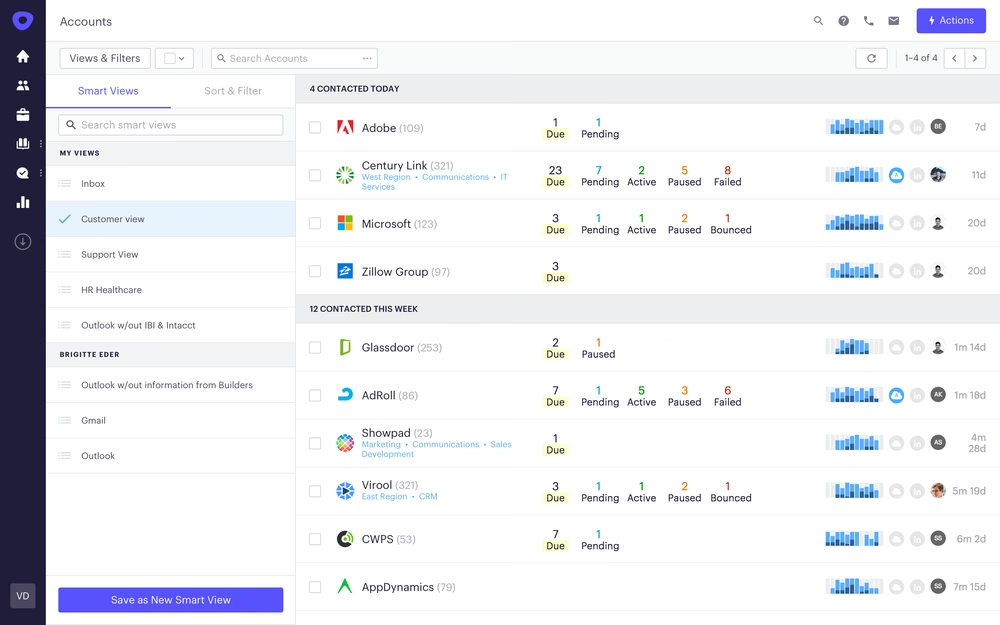
Outreach optimizes and automates sales processes, improving communication and collaboration. This makes it essential for businesses enhancing their sales team's efficiency and effectiveness.
Key Features:
- Sales Automation: Automates repetitive sales tasks and processes.
- CRM Integration: Seamlessly connects with popular CRM platforms.
- Analytics and Reporting: Provides insights into sales performance and engagement.
- Collaboration Tools: Facilitates team collaboration and communication.
- Customizable Workflows: Allows businesses to tailor workflows to specific needs.
- Mobile Access: Allows users to access the platform on-the-go.
Pros:
- Improved Sales Efficiency: Automates tasks and streamlines processes.
- Data-Driven Insights: Provides analytics for optimizing sales strategies.
- Enhanced Collaboration: Supports team collaboration and knowledge sharing.
- Scalable for Large Teams: Suitable for businesses of all sizes.
- Comprehensive Reporting: Offers detailed insights into sales performance.
- User-Friendly Interface: Easy to navigate and requires minimal training.
Cons:
- Pricing: Custom pricing may be a barrier for small businesses.
- Setup Complexity: Initial setup may require technical assistance.
- Learning Curve: New users may need time to adapt to all features.
- Customization Limitations: Some features may not be customizable to specific needs.
- Feature Overload: Extensive features may overwhelm some users
Pricing:
Contact for Pricing: Based on specific business needs and scale.
Best For:
Businesses seeking to optimize their sales engagement and automate processes through a comprehensive platform.
How to Choose the Right Sales Enablement Tool
See what to look for in an enablement and coaching platform:
To choose the right sales enablement tool, consider various factors to ensure it aligns with your business needs. Key aspects to consider include:
- Identify Your Needs: Determine specific features and functionalities important for your sales team. Are you looking for lead generation, content management, or training tools?
- Budget Considerations: Evaluate your budget and compare the pricing of different tools, considering both initial costs and potential long-term expenses.
- Ease of Use: Look for a tool that is user-friendly and requires minimal training for your team to get started.
- Integration Capabilities: Ensure the tool can seamlessly integrate with your existing CRM and other software systems.
- Scalability: Consider whether the tool can accommodate your business as it grows and scales.
- Customer Support: Evaluate the level of customer support offered by the vendor to ensure you have access to assistance when needed.
- Trial Periods: Take advantage of free trials or demos to test the tool and ensure it meets your requirements before making a commitment.
Benefits of Using Sales Enablement Tools
1. Enhanced Sales Efficiency
Sales enablement tools automate repetitive tasks and streamline processes, allowing sales teams to focus on high-value activities. This leads to improved productivity and efficiency.
2. Improved Customer Engagement
By providing sales teams with the right content and insights, sales enablement tools help improve customer interactions and engagement. This leads to more meaningful conversations and better customer relationships.
3. Data-Driven Insights
Sales enablement tools offer valuable analytics and insights into sales performance, helping businesses make informed decisions and optimize their sales strategies. To turn that data into an ROI number leadership will accept, see our guide to sales enablement ROI.
4. Scalable Solutions
These tools accommodate businesses of all sizes, offering scalable solutions that grow with your company.
5. Seamless Integration
Sales enablement tools integrate with existing CRM and other software systems, ensuring a seamless data flow across platforms.
6. Enhanced Collaboration
These tools facilitate team collaboration and communication, allowing sales teams to work together more effectively and share knowledge and insights.
Outdoo AI's Unique Advantage
Most enablement tools stop at giving reps content and training. Outdoo AI goes further by making sure reps can actually execute. Its core strength is AI roleplay: reps practice the exact conversations they will face against realistic AI buyer personas, then get scored on the same framework across practice and live calls. That closes the loop most enablement programs leave open, the gap between what reps learn and what they do.
Whether you want to ramp new reps faster, prepare your team for complex multi-stakeholder deals, or prove that your enablement investment actually changes how reps perform, Outdoo AI connects practice to real-world results. To see how it works, schedule a demo with Outdoo AI.
Frequently Asked Questions
.svg)
The best sales enablement tools for 2026 include Outdoo, Dialpad, Dealfront, Whatfix, Gartner, Highspot, HubSpot, Spekit, Allego, and Outreach. Each tool offers unique features that cater to different aspects of sales enablement, such as AI-powered insights, lead generation, content management, and training.
Sales enablement tools improve productivity by automating repetitive tasks, streamlining processes, and providing sales teams with the necessary content and insights. This allows sales representatives to focus on high-value activities, leading to enhanced efficiency and effectiveness in closing deals.
When selecting sales enablement software, look for features such as content management, lead generation capabilities, integration with CRM systems, analytics and reporting, and training tools. Additionally, consider user-friendly interfaces and customization options to meet your specific business needs.
However, B2B sales enablement tools may focus more on lead generation and relationship management, while B2C tools might emphasize customer engagement and marketing automation.
Outdoo revolutionizes sales training and performance by creating a seamless connection between practice and real-world execution. Our AI-driven platform enables enterprise teams to engage in realistic roleplay scenarios that mirror actual customer interactions, ensuring that training translates directly into improved sales outcomes. With comprehensive post-call analysis and adaptive feedback, Outdoo empowers sales leaders to measure skill application and drive continuous improvement, fostering a culture of accountability and excellence across the organization.
Table of Contents
Talk to Sales
Have questions about training and enablement for your sales, CS, support, or leadership team? Let's talk.
Talk to Sales