



Outdoo enables revenue teams in your organisation to capture insights from their meetings and calls. Insights from real-world calls help to coach your teams better and ramp up onboarding.
When you combine your HubSpot CRM data with Outdoo AI, you get unmatched visibility into how your reps are interacting with your customers and what's going on in your accounts.
With Outdoo AI, you can
- Figure patterns in won/lost deals
- Replicate best-practices across teams
- Find closing opportunities
- Do root-cause analysis for lost leads
- Listen to customers’ voice
Integration features
Increase conversations. Faster.
Get complete visibility into your customer conversations. Outdoo AI helps you close deals faster and hear the voice of your customers. Find what is helping you close high value deals and what’s not.

Amplify your sales call data.
Identify who is performing well and scale the best practices across your revenue teams. Outdoo captures every customer call, web conference, and email. You can see how deals are progressing and what you could be doing better.
Streamline Insights with Two-Way data sync
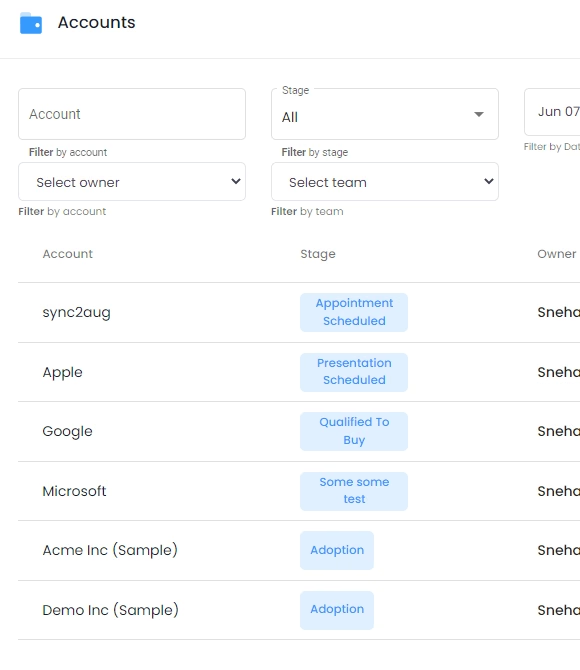
Outdoo pushes call data to HubSpot, so customers can view call activities and highlights directly from HubSpot to save time.
Call highlights, URL to recording, and participants info will appear under a new meeting in HubSpot CRM linked to Deal / Company / Contact.

Scenarios
1. Contact added but deal not created yet in Hubspot
Many sales reps prefer creating just the contact first, and deal/company later when there is positive next step from prospective customer/opportunity.
In this case, the recording data will be added as a ‘note’ activity under the identified contact.
2. Deal and Company created along with the contact
If the meeting participant is found associated with a deal, and/or company. The recording data will be added as a ‘note’ activity to the deal and company as well.
How do I integrate Outdoo AI with Hubspot account?
To integrate your Hubspot account with Outdoo AI
1. Go to integrations page on Outdoo AI Settings
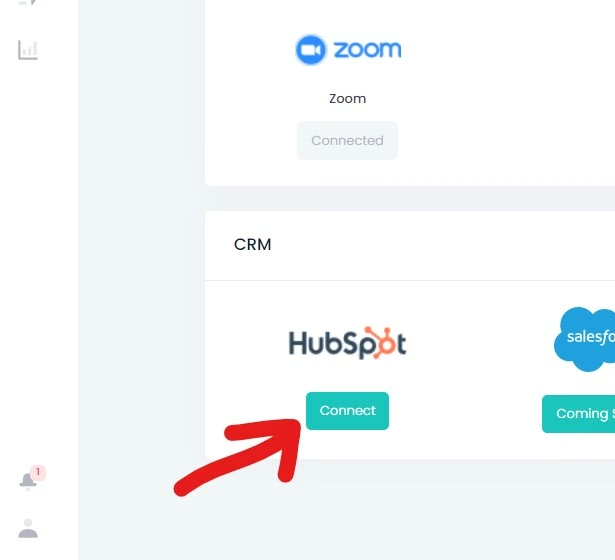
2. Click on the 'Connect' button below Hubspot Icon
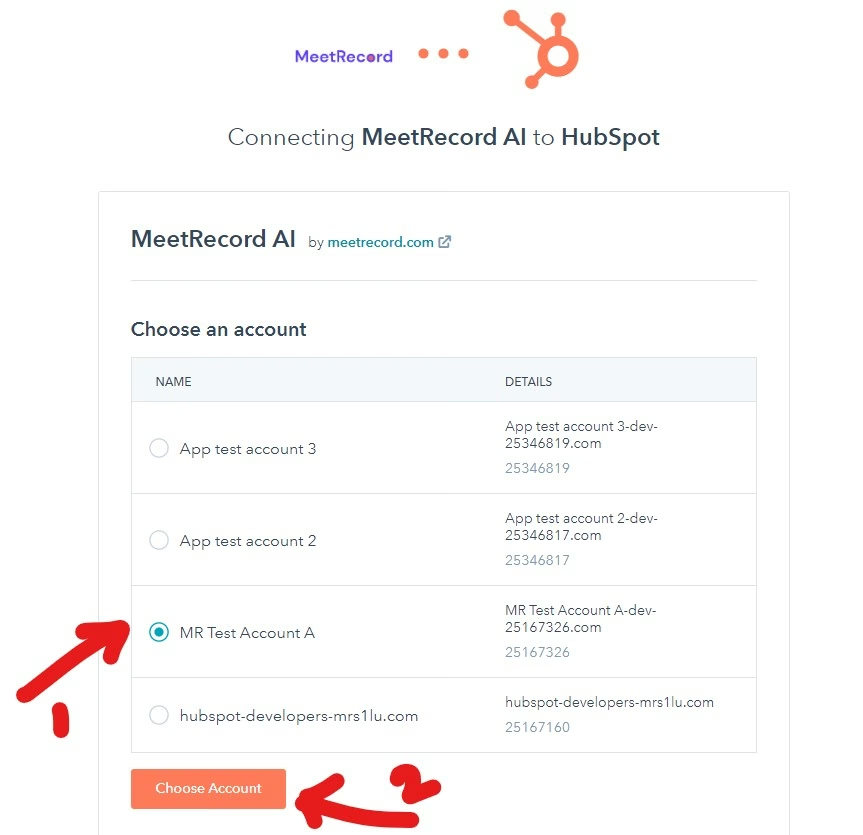
3. Choose account and Authorize the Outdoo AI app on Hubspot.
4. Go to the opportunities section to see the synced in deals and company details
Streamline your workflows and give complete access to call insights to your revenue teams with Outdoo AI's Hubspot integration. If you have something specific in mind, connect with us on support@outdoo.ai
Frequently Asked Questions
.svg)
Meeting insights in HubSpot CRM refer to the valuable information and patterns derived from analyzing customer interactions during meetings and calls. These insights can help teams understand what strategies are effective in closing deals and identify areas for improvement.
However, generally, preparing for meetings in HubSpot involves reviewing past interactions, setting clear objectives, and ensuring all necessary materials are organized ahead of time.
Common mistakes in meeting management often include failing to follow up on action items, not recording meeting notes, and neglecting to review insights from past meetings.
Typically, AI Meeting Assistants in HubSpot help automate scheduling, provide reminders, and may analyze meeting data to offer insights for future interactions.
Outdoo transforms your team's meeting insights by seamlessly integrating real customer interactions with advanced AI-driven analysis. By capturing data from live calls and roleplay scenarios, Outdoo enables teams to pinpoint effective strategies, identify skill gaps, and validate the impact of coaching on performance. This comprehensive feedback loop not only enhances individual capabilities but also ensures that your enterprise's training initiatives translate into measurable results in real-world engagements. With Outdoo, you can confidently close the loop from practice to performance, driving continuous improvement across your organization.

.webp)