



Demo calls are where deals are won or lost, products get adopted or abandoned, and customer relationships either deepen or stall. Yet most organizations never formally train their teams on how to run one. The assumption is that if someone knows the product well enough, they can demo it. That assumption is wrong.
Knowing the product is table stakes. Running an effective demo is a performance skill that combines storytelling, screen navigation, audience reading, objection handling, and real-time adaptation, all happening simultaneously. A rep who can explain every feature in a slide deck but freezes when a CFO interrupts the screen share with "skip ahead to pricing" has a demo skill problem, not a product knowledge problem.
This is not only a sales challenge. Customer success teams run product walkthroughs for onboarding and expansion. Support teams demo troubleshooting workflows. Implementation teams walk clients through configuration. Training teams show new hires how internal tools work. Any team that shares a screen while talking to a customer or colleague faces the same dual-task problem: navigating software and holding a conversation at the same time.
Gartner research shows that B2B buyers spend only 17% of their buying journey meeting with potential suppliers. When the demo is one of the only live touchpoints, the stakes are disproportionately high. A bad demo does not just lose that deal. It shapes how the prospect thinks about your entire category.
AI roleplay changes how teams prepare for demo calls by letting them practice the full demo motion: screen sharing, talking, handling interruptions, and adapting to different audiences, all in a safe environment with structured scoring. This guide covers how to build a demo call training program that works across sales, customer success, support, and onboarding teams.
Why Product Knowledge Alone Does Not Make a Good Demo
Demo training in most organizations follows a predictable pattern: product walkthrough, feature documentation, maybe a few recordings of top performers. The result is reps who know what the product does but struggle with the live performance of showing it to another person.
The core problem is that a demo is a multi-channel performance. The rep is talking, listening, reading body language (or chat reactions on a video call), navigating software, and making real-time decisions about what to show next, all at the same time. AI roleplay is the only training method that replicates all of these channels simultaneously in a practice environment.
Why AI Roleplay with Screen Sharing Changes Demo Training
Most AI roleplay platforms support voice-only or chat-based practice. That is useful for cold calls and discovery, but it misses the defining challenge of a demo call: the screen share. Reps need to practice talking and navigating software simultaneously, handling interruptions while their screen is visible, and recovering when they click to the wrong page in front of the prospect.
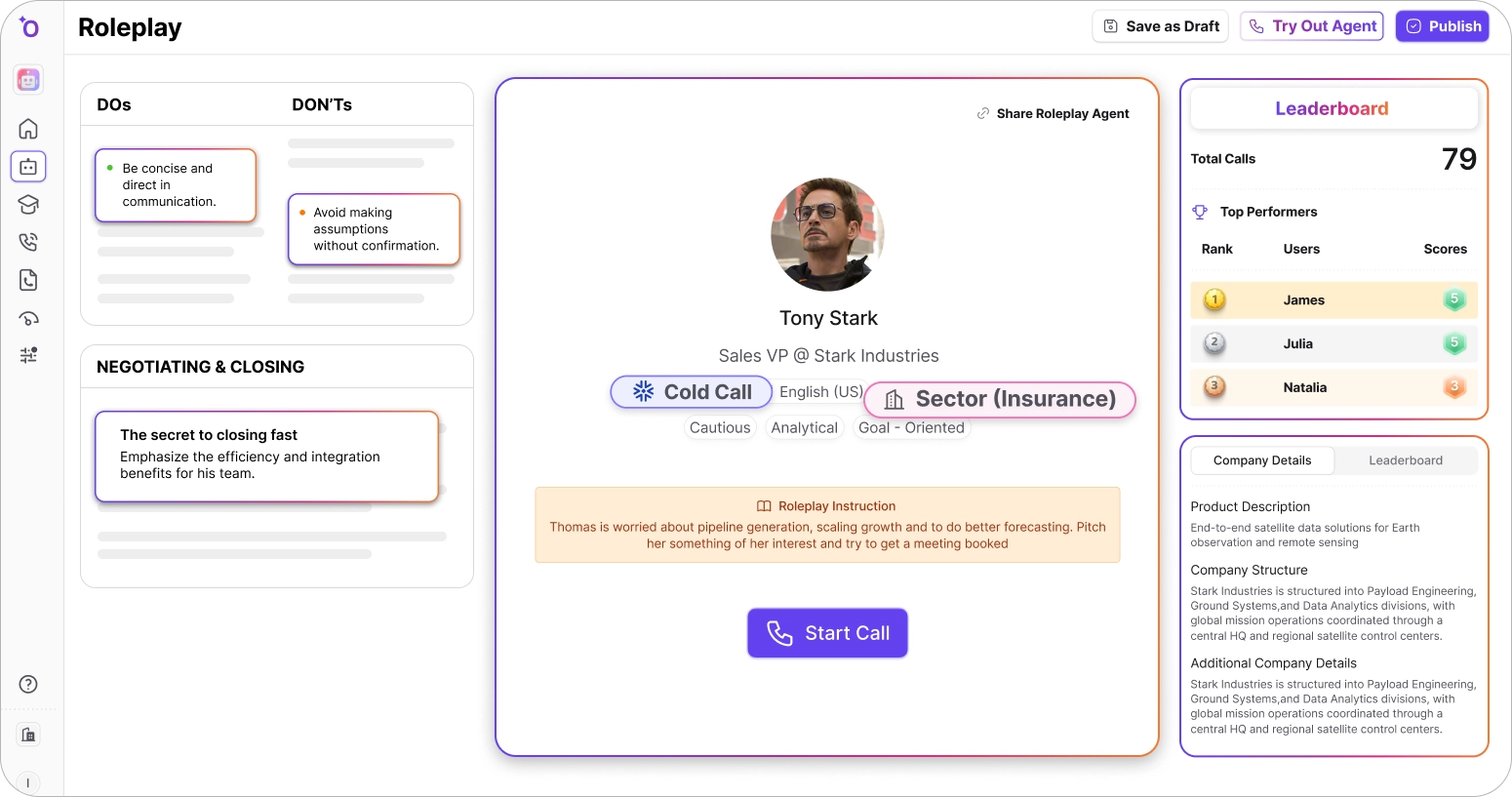
Here is how easy it is to set up roleplay agents in Outdoo AI for demo call scenarios with screen sharing:
Demo Calls Happen Across Every Customer-Facing Team
When teams hear "demo training," they think sales. But screen-sharing conversations happen across every function that interacts with customers. Each has different goals, different audiences, and different failure modes, but the underlying skill is the same: talking and navigating software simultaneously under time pressure.
A single AI roleplay platform configured with role-specific scenarios and scoring criteria can serve all five of these functions. The practice environment is the same (screen sharing plus conversation), but the personas, scoring rubrics, and success criteria differ by team.
Five Demo Call Skills Every Rep Should Master Before Going Live
A demo call is a simultaneous performance across multiple channels. These five skills each address a different channel, and weakness in any one of them can collapse an otherwise strong demo.
1. Tailoring the narrative to who is in the room
What it sounds like: Showing the same product in fundamentally different ways depending on whether the audience is a VP evaluating strategic fit, a manager evaluating daily workflow, or a technical lead evaluating architecture and integration.
Why it is hard: Most reps default to one demo flow and run it regardless of who is watching. The skill is reading the room (or the attendee list) and restructuring the narrative on the fly. A VP wants outcomes and ROI. A manager wants workflow and time savings. A technical lead wants architecture, integrations, and security. Showing the wrong layer to the wrong person loses attention in minutes.
What good looks like: The rep opens by confirming what each attendee cares about, then sequences the demo to address the highest-priority concern first. They use different language for different personas: business impact for executives, workflow efficiency for managers, technical specifics for evaluators. The product is the same. The story changes completely.
How to practice this with AI roleplay: Build three versions of the same demo scenario: one with an executive-only audience, one with a manager-level audience, and one with a mixed group. Score against whether the rep adjusted their opening, feature sequencing, and language for each audience. The mixed-group scenario is the hardest and most realistic, because it forces the rep to switch registers mid-demo. In multi-persona mode, configure a VP who keeps asking "what does this mean for our Q3 targets?" alongside a technical lead who keeps asking about API rate limits. Reps who can satisfy both in the same session are ready for real buying committees.
2. Handling interruptions without losing the narrative thread
What it sounds like: "Can you go back to that screen?", "What about [feature you have not shown yet]?", "How does this compare to [competitor]?", "Sorry, I joined late, can you catch me up?"
Why it is hard: Interruptions break the rep's prepared flow. Most reps either answer the question and lose their place, or try to defer ("I'll get to that in a minute") and frustrate the prospect. The skill is answering the question concisely, then smoothly reconnecting to the narrative without making the detour feel like a disruption. This is the demo equivalent of objection handling, and it requires the same kind of practiced composure.
What good looks like: Acknowledge the question, give a concise answer (or navigate to the relevant screen if needed), then bridge back to the main narrative with a transition like "and that connects directly to what I was about to show you." The prospect should feel heard without the demo feeling derailed.
How to practice this with AI roleplay: Configure the AI persona to interrupt at three specific moments: during the opening setup (tests whether the rep can handle early disruption), during the core value section (tests whether they can address a tangent without losing their strongest material), and during the close (tests whether they can handle a last-minute objection without losing momentum toward the next step). Score against recovery speed, answer quality, and whether the rep reconnected to the narrative or abandoned it after the interruption.
3. Screen navigation and conversation at the same time
What it sounds like: Silence. The rep stops talking while they search for the right screen, click through menus, or wait for a page to load. The prospect stares at a frozen cursor and starts checking their email.
Why it is hard: Talking and navigating software simultaneously is a genuine dual-task challenge. Cognitive load increases when the rep has to find something on screen that they did not pre-stage, and the natural response is to go silent while they concentrate on the navigation. Every second of silence on a demo is a second where the prospect disengages.
What good looks like: The rep narrates what they are doing as they navigate: "Let me pull up the reporting dashboard, this is where your managers would see the daily metrics." They pre-stage the most important screens but have practiced navigating to unexpected screens smoothly. If they need a moment, they fill the silence with context or a question: "While this loads, what does your current reporting workflow look like?"
How to practice this with AI roleplay: Use video roleplay with screen sharing and configure the AI persona to request screens the rep did not pre-stage. "Can you show me what the admin settings look like?" or "What happens when a user makes an error?" Score against dead-air time (seconds of silence while navigating), whether the rep narrated their navigation, and whether they filled loading time with a relevant question or context. This skill is nearly impossible to practice without screen sharing roleplay because the dual-task pressure only exists when a real screen is involved.
4. Managing a group demo with competing priorities
What it sounds like: Three to five people on a call, each with different roles, different questions, and different definitions of success. The VP wants to talk ROI. The end-user wants to see the daily interface. The security lead wants to talk about data handling. All of them want their questions answered first.
Why it is hard: Group demos are a political exercise as much as a product exercise. Prioritizing one stakeholder's questions over another's sends a signal about whose concerns matter. Spending too long on technical details loses the executive. Staying too high-level loses the evaluator. The skill is reading the power dynamics in the room and allocating time proportionally to influence, not just curiosity.
What good looks like: The rep sets expectations at the start ("I want to make sure everyone gets what they need, so I'll cover the business case first, then dive into the technical workflow, and we'll leave time for security questions at the end"). They check in with each stakeholder by name. They read signals about who is engaged and who is drifting, and adjust pace accordingly.
How to practice this with AI roleplay: This is where multi-persona simulation is essential. Configure a scenario with three AI personas: an executive focused on cost and outcomes, a manager focused on workflow and adoption, and a technical evaluator focused on integrations and security. Each persona has a different patience threshold and will disengage (stop asking questions) if their concerns are not addressed within the first third of the demo. Score against whether the rep acknowledged all three stakeholders, whether they allocated time proportionally, and whether each persona was still engaged at the end. Run the same demo with different priority orderings to practice the adaptation skill.
5. Closing with a clear next step instead of trailing off
What it sounds like: "So... do you have any other questions?" followed by an awkward silence, followed by "We will send you a follow-up email." The demo ended, but nothing was actually decided.
Why it is hard: Reps are often so focused on the product portion of the demo that they run out of time or energy for the close. The transition from showing to asking feels abrupt, especially if the demo went well and the rep does not want to "ruin" the positive tone by pushing for commitment. The skill is making the transition feel natural: connecting what was shown to what happens next, and proposing a specific action rather than leaving the door vaguely open.
What good looks like: The rep summarizes the three things that resonated most (based on the prospect's reactions during the demo, not the rep's favorite features), connects them to the outcomes the prospect mentioned at the start, and proposes a specific next step: a technical evaluation, a pilot, a meeting with the decision-maker, or a pricing conversation. The next step should be concrete and time-bound.
How to practice this with AI roleplay: Configure the AI persona to give mixed signals during the demo: enthusiastic about some features, lukewarm about others, and silent on one section. Score against whether the rep's close reflected what the persona actually responded to (not what the rep wanted them to care about), whether they proposed a specific next step, and whether the next step was appropriate for the persona's role and engagement level. A VP who was engaged deserves a different close than a manager who was checking out by the halfway mark. Practice the close 10 times with different engagement patterns to build the reading-the-room instinct.
How to Build a Demo Call Training Program with AI Roleplay
A structured program turns demo skills into a repeatable system. Here is how to build one using AI roleplay across your customer-facing teams.
Step 1: Map your demo types by team and audience
Different teams run different demos with different goals. Before building scenarios, map the demo types that exist in your organization: sales product demos, customer success onboarding walkthroughs, support troubleshooting sessions, implementation configuration demos. For each type, identify the typical audience (executive, manager, technical, end-user) and the success criteria (deal advancement, adoption, resolution, competency).
Step 2: Build scenario packs by demo type and audience
Create separate roleplay scenarios for each demo type. A sales demo to a VP requires different practice than a CS onboarding walkthrough with a new user. Each scenario should specify the persona (role, priorities, patience level), the product screens involved, and the scoring criteria specific to that demo type. Skill isolation works here too: build interruption-only scenarios, close-only scenarios, and multi-stakeholder scenarios separately before combining them into full demo runs.
Step 3: Score against demo-specific criteria
Generic sales scorecards miss what makes demos succeed or fail. Build rubrics that evaluate: narrative tailoring (did the rep adapt to the audience?), interruption recovery (how fast did they get back on track?), dead-air time (seconds of silence during navigation), stakeholder balance (did they address all personas?), and close quality (was the next step specific and appropriate?). Align to your methodology framework for the commercial criteria and add demo-specific behavioral criteria on top.
Step 4: Use real customer scenarios for practice grounding
Pull demo scenarios from real pipeline deals and real customer accounts. Configure AI personas using actual stakeholder profiles from your CRM. Conversation intelligence data from past demos can reveal which questions come up most, where reps lose engagement, and which demo sections correlate with deal advancement. Use this data to build practice scenarios that mirror the exact situations your team will face.
Step 5: Close the loop between practice demos and real demos
Score real demo calls on the same rubric used in practice. The gap between practice performance and live performance reveals whether the training is working and where specific reps need more practice. A rep who scores well on tailoring in practice but poorly on live demos may need confidence building. A rep who scores poorly on both needs more fundamental skill work. The closed-loop coaching system makes this visible without requiring managers to sit through every demo.
How to Measure Whether Demo Training Is Improving Outcomes
Demo effectiveness is measurable when you know what to track. These metrics connect demo skill to the outcomes each team cares about.
Getting Started with AI Roleplay for Demo Calls
Demo calls are the highest-stakes screen-sharing conversations your team runs. A bad discovery call costs a meeting. A bad demo costs a deal, an onboarding, or a customer relationship. Yet most organizations invest more in product training than in the performance skill of delivering that product knowledge live to another person.
AI roleplay with screen sharing gives teams a practice environment that matches the real challenge: talking and navigating simultaneously, handling interruptions from multiple stakeholders, and adapting the narrative in real time. No other training method replicates all of these channels at once.
If you are building this for the first time, start with the team and demo type where the gap between product knowledge and live delivery is most visible.
Week 1: Identify your highest-impact demo type. Which team runs the most demos? Where is the biggest gap between product knowledge and demo quality? For most organizations, sales product demos or customer success onboarding walkthroughs are the starting point. Pull conversation intelligence data on win rates, engagement drop-off, and common failure points.
Week 2: Build scenario packs for that demo type. Create three to five roleplay scenarios: a single-stakeholder executive demo, a single-stakeholder technical demo, and a multi-stakeholder group demo. Include at least one scenario where the AI persona interrupts frequently and one where the persona requests screens the rep did not pre-stage. Test with your top performer to validate realism.
Week 3: Run a practice sprint and establish baselines. Have each rep complete five to eight full demo roleplays with screen sharing. Score against your demo rubric and identify team-wide patterns: is the biggest gap in tailoring, interruption recovery, navigation fluency, or close quality? Use these patterns to prioritize which skills get targeted practice in the following weeks.
Week 4 and beyond: Score live demos on the same rubric. Once practice baselines exist, start scoring real demo calls. The practice-to-live gap is the coaching conversation. A rep who demos well in practice but struggles live may need help with confidence or call control. A rep who struggles in both needs more fundamental demo skill development. Expand to additional teams and demo types as the system proves value.
Outdoo AI is one of the few platforms that supports video roleplay with screen sharing, which makes it uniquely suited for demo call training. Reps practice the full demo motion: sharing their screen, navigating the product, and engaging with AI personas who interrupt, ask questions, and push back in real time. Methodology-aligned scorecards evaluate narrative tailoring, interruption recovery, navigation fluency, stakeholder balance, and close quality across SPIN, BANT, MEDDIC, MEDDPICC, and Challenger. Multi-persona simulations replicate buying committees with up to three stakeholders. The same scorecard scores practice and live demos, so the gap between training and real performance is visible from day one. Teams across sales, customer success, support, and onboarding use the same platform with role-specific scenarios and scoring.
If your team is ready to train on demo calls the way they actually happen, not the way slide decks describe them, book a demo to see how it works in your environment.
Frequently Asked Questions
.svg)
Demo calls combine multiple simultaneous skills: storytelling, screen navigation, audience reading, objection handling, and real-time adaptation. Product knowledge alone does not prepare reps for this multi-channel performance. Most demo failures are not about the product. They are about the delivery: feature tours instead of tailored narratives, dead air during navigation, and weak closes.
AI roleplay with screen sharing replicates the exact dual-task challenge of a real demo: talking and navigating software simultaneously while AI personas interrupt, ask questions, and request to see different screens. This is the only training method that practices all demo skill channels at once. Structured scoring evaluates narrative tailoring, interruption recovery, dead-air time, and close quality.
No. Customer success teams run onboarding walkthroughs, support teams demo troubleshooting workflows, implementation teams walk clients through configuration, and internal training teams demo tools for new hires. Any team that shares a screen while talking to a customer or colleague benefits from structured demo practice. AI roleplay platforms like Outdoo AI support role-specific scenarios and scoring for all these functions.
Track demo-to-next-step conversion for sales, time-to-value for customer success onboarding, first-contact resolution for support, practice-to-live score gap, stakeholder engagement scores in group demos, and dead-air ratio during navigation. The practice-to-live score gap is the most actionable metric because it reveals where training translates and where it does not.
Yes. Platforms like Outdoo AI support up to three AI personas in a single demo roleplay: for example, a VP focused on ROI, a manager focused on workflow, and a technical lead focused on integrations, each with different patience thresholds and engagement patterns. This replicates the group demo dynamic where competing priorities must be balanced in real time.
Table of Contents
Talk to Sales
Have questions about training and enablement for your sales, CS, support, or leadership team? Let's talk.
Talk to Sales