The biggest tax on any training tool isn't the learning curve. It's the fragmented context across tools and tabs. A team member prepping for a call has the account open in Salesforce, and practice, if it happens at all, lives somewhere else: one more login, one more context switch. Most of the time, "I'll practice after this call" quietly becomes never.
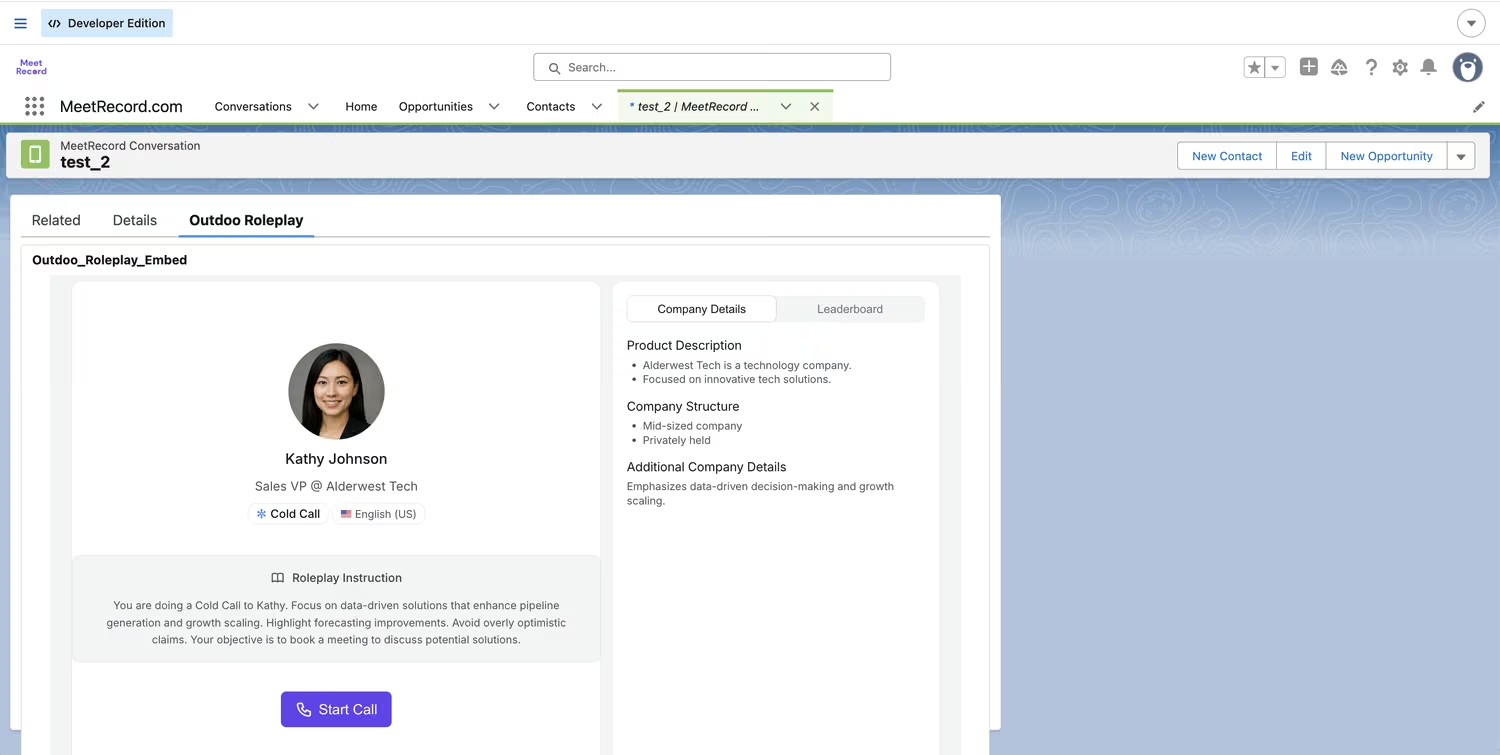
Roleplay agents can now embed directly into a Salesforce Lightning page. A team member opens the account or opportunity they're about to call on, and the practice panel is already sitting there. No new tab, no separate login screen to think about first.
Why this matters
This isn't a Salesforce integration in the sense of syncing data (that's a separate piece, syncing meeting notes and call data into records). It's simpler and more physical: one roleplay agent, rendered as a live panel, on the page where the team member already spends their day.
That's most of the gap between a feature getting used and a feature getting ignored: whether practice is one more tool, or it's just right here.
How it works
Under the hood, this is a sandboxed <iframe> pointed at a single agent. Nothing about the mechanism is Salesforce-specific, which is why the same approach works in other tools too (more on that below).
Getting it live takes four steps. An Admin or Manager opens the agent's menu under Roleplay → Agents, selects Embed agent, optionally sets a width and height, and copies the generated iframe HTML. That snippet gets pasted into a new Visualforce page in Salesforce Setup, with page security set to whichever profiles should have access.
The two steps after that exist because Salesforce blocks cross-origin frames and camera/microphone access by default, so both need to explicitly allow Outdoo through. Under Trusted URLs, the Outdoo domain gets added with connect-src and frame-src as CSP directives, plus camera and microphone access granted for anything beyond a chat-only agent. Under Session Settings, the Permissions Policy header gets turned on, with camera and mic set to Trusted URLs.
From there, it's a standard Lightning App Builder step: drag a Visualforce component onto the page, point it at the page just created, save, and activate.
The first time a team member opens the panel, they'll hit a sign-in screen instead of the agent.
Sign in with Outdoo keeps them in the same tab; a "sign in in new tab" fallback exists for identity providers that refuse to load a login page inside a frame.
After that, it's a normal session: start a call, chat, or video roleplay depending on how the agent's configured, get scored, go again.
What's gated, and why
A few boundaries are worth knowing up front rather than discovering mid-setup. Generating an embed code requires the Admin or Manager role. The agent has to be published and Active, no drafts.
It has to be a single-persona agent, since multi-persona agents aren't supported in the embed yet. And it can't carry a workflow or screen-capture step, because that step depends on Outdoo's browser extension, and an extension can't run inside an iframe someone else's page controls.
If an agent doesn't clear those four conditions, Embed agent simply won't show up in its menu. That's the signal something's not eligible yet, not a bug.
Where else this goes
Salesforce is the first host we've documented in depth, but nothing about the embed is Salesforce-specific. It's a plain iframe against one agent, so it works anywhere a tool accepts custom HTML.
The same snippet drops into a Highspot or Seismic tile next to a battlecard, a Docebo or Cornerstone course step, or a Notion or Confluence page paired with a playbook.
The setup pattern repeats: find that platform's equivalent of Trusted URLs, its frame or CSP allowlist, and grant it the same access Salesforce needs. We've written up the general version separately for exactly that case.
What this unlocks
For a sales team already living inside Salesforce, this closes the gap between "we have a training tool" and "team members actually open it before a call."
An SDR prepping for a discovery call can run a quick roleplay against the buyer persona for that account, on that account's page, in the ninety seconds before the call starts.
Not as a separate task on a to-do list, but as part of opening the record. It also gives managers a lower-friction way to point a team member at practice mid-deal: drop a link to the same record, and the practice panel is already where they'll land.
The bigger picture
Training tools fail less often because they're bad and more often because they're one click too far from where the work happens. This puts practice exactly where the work already is.
Setup details, including camera/microphone troubleshooting, are in Embed a Roleplay Agent in Salesforce and, for every other host, Embed a Roleplay Agent Anywhere.
See it in Action
Tell us what you're working on, whether that's sales calls, support tickets, or leadership coaching, and we'll show you how it fits.
Talk to Sales